|
I'm trying to add a boundary to the list for a Protected DP. However,
every time I click the yellow starburst button on the "Boundaries" screen to
add a new boundary I get the following dialog box:
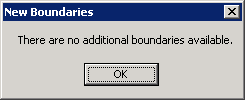
My Site only has Site Boundaries defined and these are defined
correctly. It's as though when trying to add the boundary to the Protected
DP SMS isn't "seeing" the Site boundary list.
Contributed By:
Cliff Hobbs [MVP
ConfigMgr SMS]
If you only have Site Boundaries defined make sure the "Include
site boundaries within the local roaming boundaries of this site"
checkbox is checked on the "Roaming
Boundaries" tab. To check this:
- Load the SMS Administrator Console.
- Navigate to "Systems Management Server | Site
Database (<Site_Code>
- <Site_Description>)
| Site Hierarchy | <Problem_Site>".
-
Right-click the problem Site and from the
context menu select "Properties".
- Click the "Roaming Boundaries"
tab.
- Ensure the "Include site boundaries
within the local roaming boundaries of this site" checkbox is
enabled.
- Click "OK".
- Try re-adding the boundary to your Protected DP (you should now see
a list of available boundaries defined for the Site that can be added to
this Protected DP).
|
 |
To see other SMS
2003 Installation and Configuration related FAQs click
here. |
|


