|
I’ve booted from my USB key and Win PE loads but it
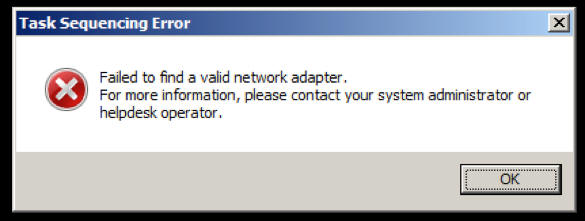
then get a “Task Sequencing Error” dialog box pop up that says:
“Failed to find a valid
network adapter. For more information, please contact your system administrator
or helpdesk operator.”
Contributed By:
Cliff Hobbs [MVP
ConfigMgr]
This sounds like it’s either a problem with
NIC drivers or your machine not being able to connect to the network. Make
sure that the “Enable command support (testing only)”
checkbox on the “Windows PE” tab of your Boot Image is
selected (if you have to enable this then you’ll need to update the Boot
Image on your DPs).
Reboot the machine and when WinPE starts press “F8”
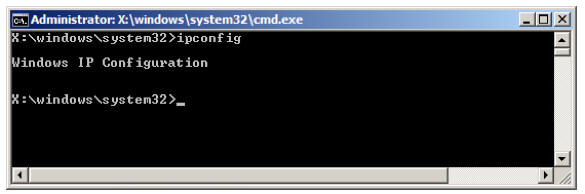
to start the Command Prompt. Type “ipconfig” in the Command
Prompt to make sure you have at least one NIC configured and a valid IP
address. In this case there were no valid NIC drivers available as the
results of “ipconfig” showed below.
If you are
seeing this error on a VMware virtual machine to save you having to modify
your boot image to include NIC drivers you can use the following process
courtesy of Josh Taylor which I can vouch for:
“If you really
don't want to import the VMware NIC drivers in to the boot image you can
open you .vmx file and change the ethernet0.virtualDev line to
ethernet0.virtualDev = "e1000". The Intel E1000 drivers are included into
the stock WinPE image. I did this in my test lab since I had issues with
using the adaptive NIC type in my particular environment anyway. There's
probably a way to do it in the GUI but I couldn't tell you where it is in
Fusion but the vmx entries should be the same across the versions.”
NOTE: This line didn’t exist in my .vmx file so I just
added it to the bottom. |