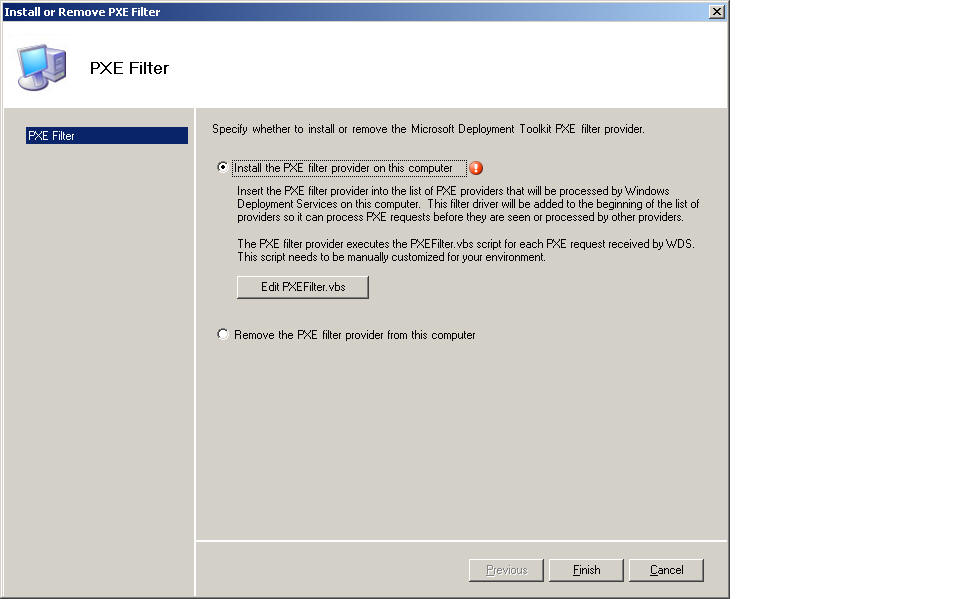
MDT: Why do I see a Red Exclamation Mark when I try to install the PXE Filter script?
|
MDT: Why do I see a Red Exclamation Mark when I try to install the PXE Filter script? |
|
I am trying to configure the PXE Filter script (Start | All Programs | Microsoft Deployment Toolkit | Configure WDS PXE Filter), but when I go to install it I see a red exclamation mark (!) beside the "Install" option.
If I click "Finish" I then get the message "Please fix all errors before continuing". Contributed By:
Cliff Hobbs [MVP
ConfigMgr]
To exit this screen just click "Cancel" and then click "Yes"
on the confirmation dialog box.
|
|
|
To see other ConfigMgr 2007 Troubleshooting related FAQs click here. |
| © FAQShop.com 2003 - 2010 |
|
|