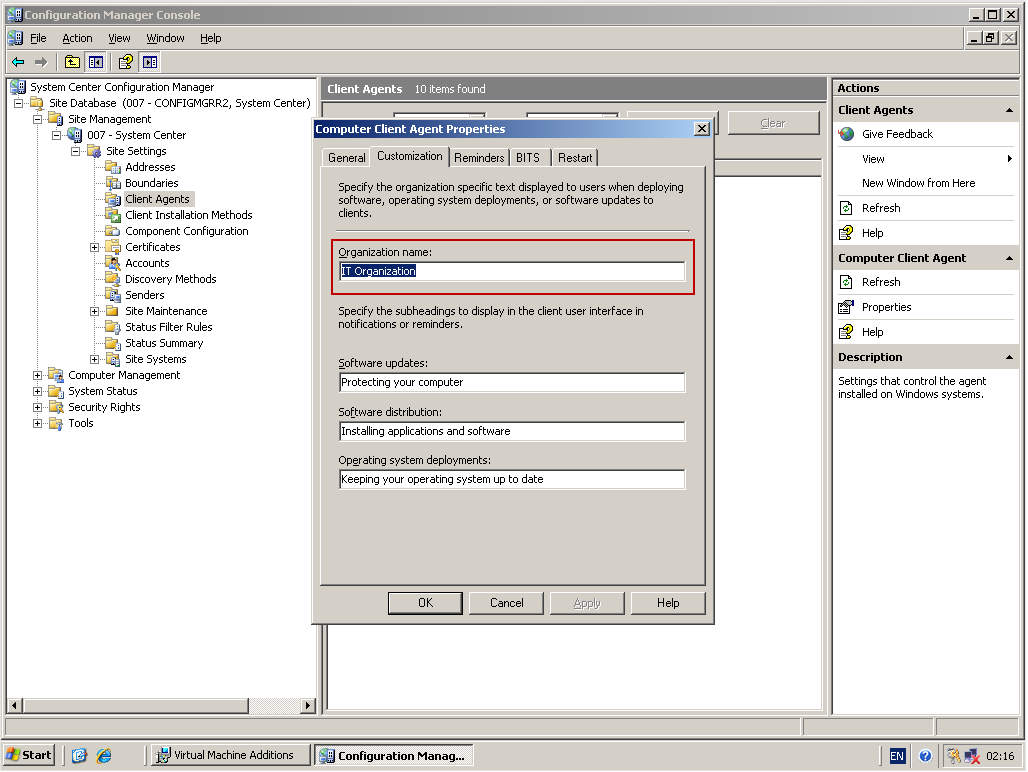
OSD: How do I change the “IT Organization” name to my company name?
|
OSD: How do I change the “IT Organization” name to my company name? |
|
I am trying to change the “IT Organization” to my company name on the screen of my Stand-Alone/ Boot Media. I’ve tried adding the following line to the [Default] section of the CustomSettings.ini file but it doesn’t work: _SMSTSOrgName = Company Name
Contributed By:
Cliff Hobbs [MVP
ConfigMgr]
However, if you’re using ConfigMgr (also known as
ZeroTouch) then you need to use the following process to change the
Organization name which I didn’t know about until my friend and fellow MVP
Ronni Pedersen told me about:
|
|
|
To see other ConfigMgr 2007 Installation and Configuration related FAQs click here. |
| © FAQShop.com 2003 - 2009 |
|
|