|
Contributed By:
Cliff Hobbs [MVP
ConfigMgr/ SMS]
Yes. By default each time you run a Query
the Site Server will process the Query until all relevant results have been
returned. Now there maybe cases where running large and complex Queries can have
a serious impact on the Site Server whilst ConfigMgr processes the request.
To help you overcome this potential issue it is possible to get ConfigMgr to
stop processing a Query once a set number of results have been returned
(especially useful when you're writing and testing new Queries). This can be
achieved either through the Registry (as in previous versions of SMS), or new to
ConfigMgr is the ability to set this via the Admin Console.
To set the Limit via the Admin Console:
-
Load the Admin Console ("Start | All
Programs | Microsoft System Center Configuration Manager 2007 |
ConfigMgr Console").
-
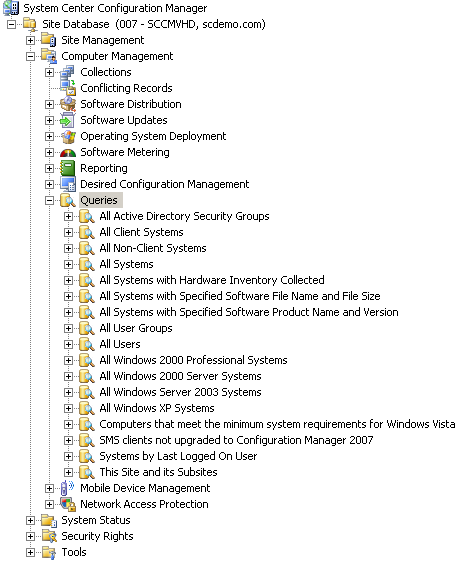
Navigate to "System Center
Configuration Manager | Site Database (<site_code><site_description>)
| Computer Management"
-
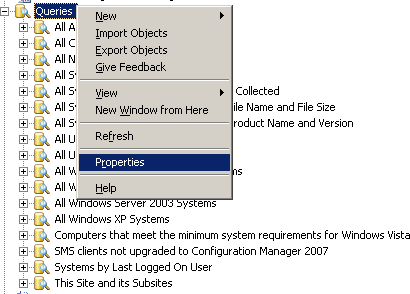
Right-click "Queries" and
from the context menu select "Properties"
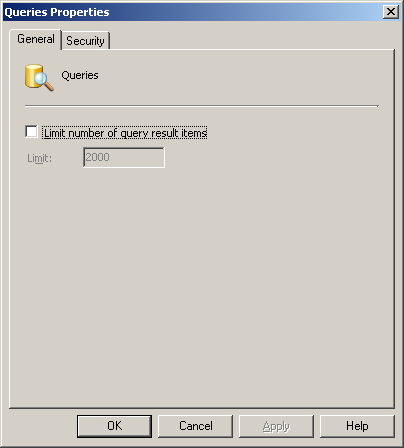
which will display the "Queries Properties"
screen.
-
Click the "Limit number of
query result items" checkbox.
-
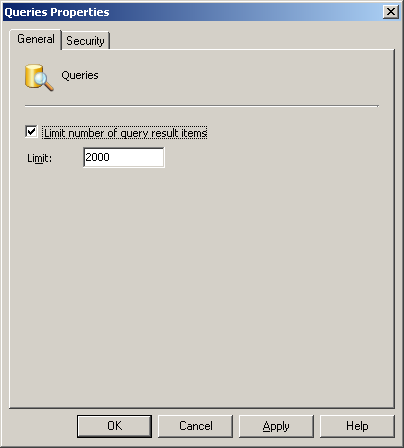
Enter the
number of results you want returned by your Queries before the Site Server
stops executing it in the "Limit:"
field. The default value is "2000".
NOTE: You may need to adjust the value
you enter in this field several times until you achieve the desired balance
between the number of results and performance. The minimum value for this
field is "0" which will return all results and
is the same as not checking the "Limit number of
query result items" checkbox. The maximum value is "2,147,483,647"
a value I'd never recommend you set as if you have an erroneous Query that
potentially generates an enormous number of results it will need to reach
this limit before ConfigMgr stops.
-
Once you've set the required value click the "OK"
button.
IMPORTANT: The
value you enter in the "Limit:" field applies
to ALL ConfigMgr Queries. In previous versions of SMS (and incorrectly stated in
the ConfigMgr Help File), it was possible to right-click on a Query and select "Run
Query Special" which would display the "Run Query
Special" dialog box where you could set the number of results to be
returned by the Query before it stopped execution.
To change the number of results returned by a Query by
modifying the Registry see KB article
269201 "Query
builder Values box cannot display large item list" although to be honest
with ConfigMgr you shouldn't need to do this as you can do it through the Admin
Console.
|